Restores discontinued Bose features

Radio & presets
back on your SoundTouch.

Bose has discontinued internet radio and preset settings in the official SoundTouch service. Your Bose SoundTouch speakers are still on your network — SoundTouch Radio Player brings those features back: custom stations, one-tap presets, multi-room play, and per-room volume from your browser.

Android app build on IBM Domino  ·  LAN-only Bose control  ·  Bose SoundTouch
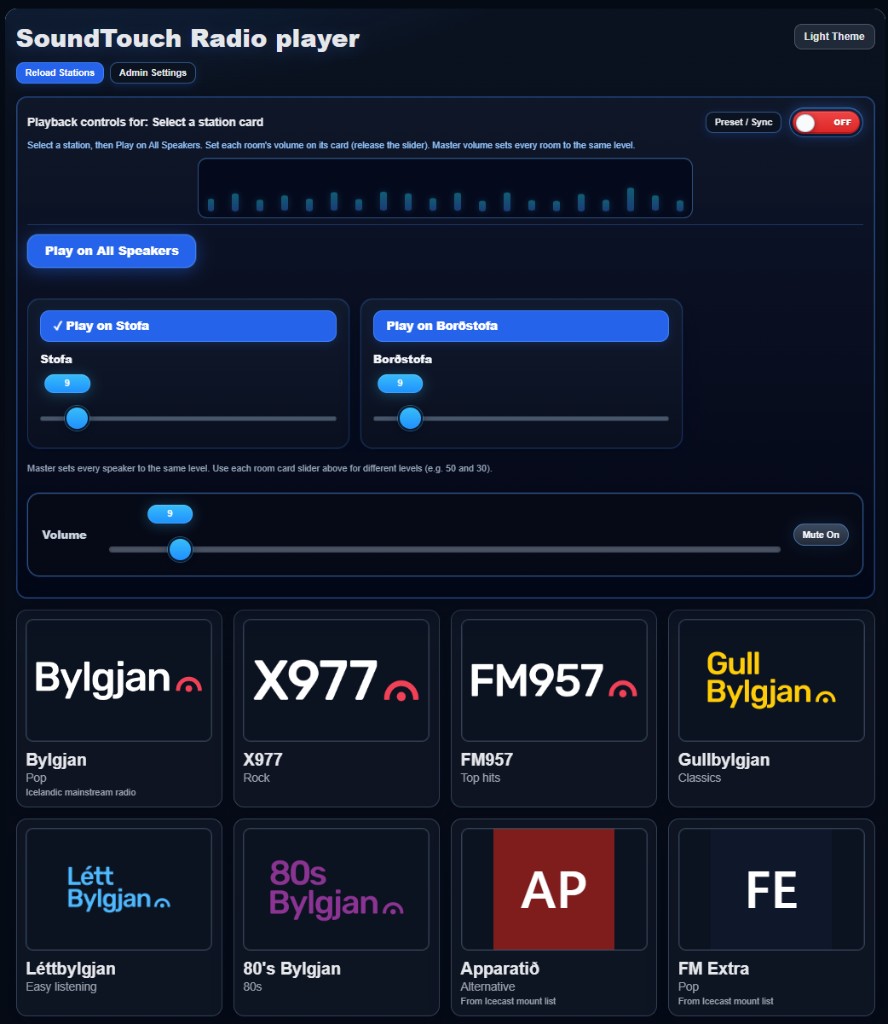
SoundTouch Radio player app screenshot

Live app UI — Iceland stations, per-room volume, and multi-speaker playback

Bose SoundTouch discontinued radio & preset settings

The official SoundTouch app and cloud service no longer offer the internet radio experience and preset management many owners relied on. If your Bose SoundTouch speakers still respond on your home network, you have not lost those capabilities — you need a new way to reach them. This application returns that functionality with direct LAN control (no dependency on Bose’s discontinued streaming portal).

The features Bose removed — restored for your speakers

Internet radio, saved favorites, and multi-room listening — the way SoundTouch used to work, now under your control.

Internet radio

Add your own station list with logos and stream URLs. Play on one speaker or every room with one click.

Preset settings

Save station + speakers + volume + sync as a named preset. Apply “morning news” or “evening jazz” in one tap.

Multi-room control

Independent volume per room, master volume, sync diagnostics, and power — without the old Bose app.

Capability Official SoundTouch (today) SoundTouch Radio Player
Internet radio / custom stations Discontinued Yes
Preset save & recall Discontinued Yes
Play same stream on all Bose SoundTouch rooms Limited / removed Yes
Per-speaker volume & sync tuning Yes
Works on your LAN (no Bose cloud radio) Yes

Requires Bose SoundTouch speakers (or compatible amplifiers) reachable on your network. Streams must use URLs your hardware can play (typically http:// for the UPNP path).

Station grid Logos & one-click play
Per-room volume Independent sliders
User presets Save & replay setups
Sync diagnostics Auto-tune offsets

Everything you need after Bose turned off radio & presets

From a single living-room speaker to a whole-house setup — the replacement control panel Bose no longer provides.

Beautiful station player

Radio cards with artwork, now playing metadata, song history, and play on one speaker or all at once.

Smart volume control

Master volume unifies every room; each speaker card has its own slider so Stofa can be loud and Borðstofa quiet.

Preset manager

Save station + speakers + volume + sync offsets. Apply favorites in one tap — morning radio, evening jazz, party mode.

Multiroom sync

Diagnostics show in-sync, out-of-sync, or offline per speaker. Re-sync all rooms or auto-tune millisecond offsets.

Admin configuration

Manage stations, logos, stream URLs, speaker lists (Name=IP), timeouts, and sync defaults from a dedicated settings page.

Polished UI

Modern Bootstrap layout, dark theme support, power switch, and responsive design for tablet or desktop control.

Up and running in three steps

Configure

Add your Bose speaker IPs, radio stations, and optional sync offsets on the settings page.

Open settings

Play

Pick a station, hit Play on All Speakers, and adjust each room’s volume to taste.

Open player

Save & sync

Save a preset for one-tap replay. Use sync diagnostics when rooms drift apart.

Read the manual

Own SoundTouch Radio Player

License the full application and keep internet radio and presets on your Bose hardware — includes player, admin, user presets, sync tools, and documentation.

Full application license

Contact for pricing

XPages app + documentation

  • Multi-room player (index.xsp)
  • Station & device admin (config.xsp)
  • Preset manager & sync diagnostics
  • User manual & setup guide
  • Source-ready XPages / SSJS codebase

Questions before purchase? Use the buy link above (update SOUNDTOUCH_LINKS.buy in this file to your store URL).

Bring radio & presets back to your Bose speakers

Bose discontinued the service — you do not have to discontinue the experience. Open the player, read the manual, or get your license today.